


All Weather Mode: Weather Home
3.9155.00 Reviews
App Specs
- Version
- 1.3.81
- Updated On
- License
- Free
- Downloads
- 500,000+
- Developer
- Clarity App Crafting
- Categories
- Personalization
- Platform
- Android
Screenshots
 Analysis by AppCompare
I like a weather app best when it helps me make a small decision quickly: take a jacket, leave earlier, or move a plan indoors. All Weather Mode: Weather Home puts weather information and a home-screen focus at the center of that routine, rather than asking me to dig through a complicated set of menus. It is a free personalization app from Clarity App Crafting, and its appeal is practical: weather becomes something I can check as part of using my phone, not a separate task that needs much setup.
What free access means for the decision
The app is free to download, so trying it does not require a purchase decision. That is the clearest point about cost: I can explore whether its weather-and-home-screen approach suits me without paying upfront. I would not treat “free” as a promise about every possible condition of use, but there is no listed purchase price to weigh against its everyday usefulness.
That makes the decision less about calculating a return on a subscription and more about whether the app earns space in my routine. If I already open a weather app several times a day, a design that makes those checks feel more immediate could be worthwhile even without a dramatic feature set. If I rarely check forecasts, the free download alone is not a reason to keep another app installed.
Where the home-screen approach can help
Weather information is most useful when it changes what I do. A forecast I glance at before leaving can help me decide whether to carry an umbrella or allow extra time, while a broader outlook can help me choose which day is better for an outdoor plan. The useful distinction is between checking conditions out of curiosity and checking them to make a decision; this app is aimed at making that habit convenient.
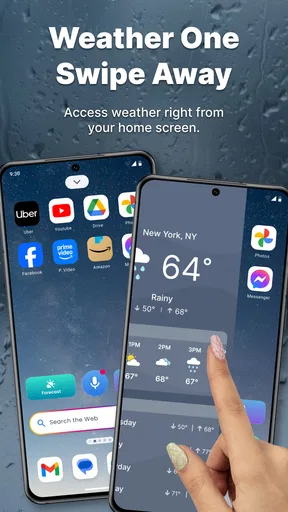
Its personalization category matters here. Rather than being only a place to open for a forecast, it connects weather with the way I use my phone’s home screen. That can be a good fit if I like my everyday screen to do more than launch apps. It is less compelling if I prefer a weather app to stay entirely separate from the look and feel of my device.
Trade-offs before you settle on it
I would still use judgment with any forecast or alert. Weather can shift, and a quick glance is not a substitute for checking conditions again before a long drive, a hike, or another plan where timing matters. Alerts are helpful prompts, not a guarantee that every change will reach me at the exact moment I need it.
There is also a real choice between glanceability and depth. A home-screen-oriented experience is convenient for routine checks, but people who want extensive tools, detailed historical information, or a highly specialized forecast may prefer a dedicated weather service built around those needs. I would compare the information I actually rely on rather than assuming that more screens or more controls automatically mean a better forecast.
Worth Reading Before You Choose

EA SPORTS FC Mobile 26 Is a Bigger Football Game, but It Takes Time

Flipboard Shows What News Apps Must Do Beyond the Feed

Switching to Android Auto Means Rethinking Your Driving Routine

Google Calendar Makes a Crowded Week Easier to Manage

Ludo King Makes the Most of the Minutes Between Plans

Baby Panda World Brings Quick Play to Modern Phones, but Its Game Library Feels Busy
Who is likely to get value
I can see this working well for someone who checks the weather before commuting, walking the dog, or deciding what to wear, and who enjoys making a phone’s home screen more useful. It is also a reasonable first option for someone who wants a straightforward way to follow everyday conditions without starting with a paid download.
On the other hand, I would skip it if I rarely look at weather, strongly prefer a minimal home screen, or depend on specialist information for outdoor work or travel. In those cases, a conventional weather app or a more focused forecasting tool may fit better. The right choice depends on whether the home-screen connection improves your routine, not simply on how many features an app can list.
First Impressions
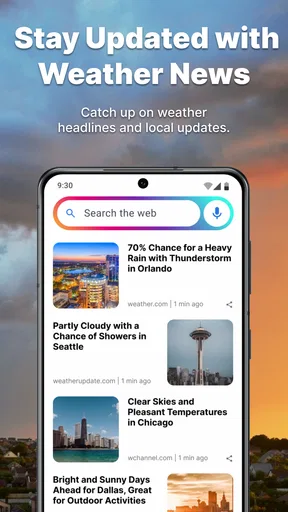
Right off the bat, All Weather Mode: Weather Home greets you with a sleek and straightforward interface. I’m a sucker for apps that don’t make me feel like I’m reading a user manual just to figure them out. The clean design with intuitive navigation made it super easy to jump in and start exploring.
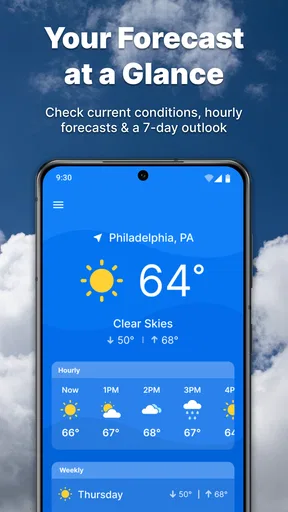
The home screen is packed with essential information, yet it doesn’t feel overwhelming. You’ve got your current temperature, weather conditions, and a neat little forecast for the next few hours right there. And oh, those weather animations? They’re not just for show; they add a nice touch of dynamism.
Features That Stand Out
Digging deeper, there are a few standout features that really make this app worth talking about:
- Hourly and Weekly Forecasts: Whether you’re planning your day or your week, the app gives detailed forecasts. I found the hourly breakdown particularly useful. For a practical routine, I’d look at the hourly view when deciding whether to walk out now or wait for a better window, then use the weekly view to pick a day for plans that can move. That small distinction keeps a broad outlook from pretending to answer an immediate timing question.
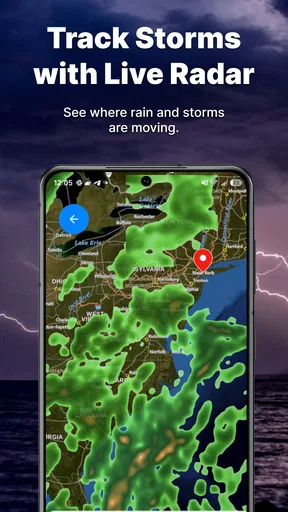
- Radar Maps: The interactive radar map is a game-changer. It’s fun to see live weather patterns roll across the map. It’s like playing a game of "where's the storm now?" I find radar most useful as a second check when the sky looks uncertain: it can help me understand whether a band of rain seems to be approaching or passing, while the written forecast remains easier for a quick summary.
- Weather Alerts: The app keeps you in the loop with timely weather alerts. I got a notification about an incoming thunderstorm, which was super handy. I’d treat a notification as a reason to check the situation, especially before heading out, rather than as a substitute for paying attention to conditions around me.
User Experience
One of the things I really appreciate about this app is its user-friendly design. Everything is responsive, and I didn’t encounter any annoying lags. The settings are customizable, so you can tweak things like units of measurement and notification preferences to suit your liking.
Another thing I noticed is how quickly the app loads data. Sometimes, with other weather apps, I feel like I’m waiting forever just to get the latest updates. This wasn’t an issue here, which is a relief.
Making it useful in an everyday routine
A realistic way I’d use it is during a busy morning: check the current conditions before getting dressed, glance at the hourly forecast before leaving, and use the alert or radar view if rain might affect the trip home. The value is in making those checks part of one quick routine, not in staring at a forecast all day. If plans change, I’d revisit the hourly view instead of relying on what I saw hours earlier.
A useful habit is to decide what question you need answered before opening the app. “What should I wear?” calls for current conditions; “When should I leave?” makes the hourly outlook more relevant; “Is this outdoor plan sensible later in the week?” is a reason to scan the weekly forecast. Keeping those questions separate helps prevent an attractive animated screen from distracting from the information that actually matters.
How it compares with familiar weather options
Compared with a basic weather app that opens to a forecast, this one’s distinguishing idea is the home-screen and personalization angle. That can make repeated checks feel more integrated with everyday phone use. A standard app may be preferable if you want weather to remain a simple, separate utility, while a specialist service is the better direction when your decisions depend on more advanced or narrowly focused forecasting.
I would not choose between them based on appearance alone. The practical test is whether the hourly forecast, weekly view, radar, and alerts answer the questions I routinely have. Someone who mostly wants today’s temperature may not need to change apps; someone who likes a weather-centered home-screen experience may find the combination more convenient. Neither approach is automatically better for everyone.
Details that help set expectations
The app has an average rating of 3.8 from around 480 ratings, with more than 100 written reviews, and has passed 500,000 installs. Those figures suggest that it has found a sizable audience, while the rating also makes me wary of treating it as a perfect fit for every phone or routine. I’d use the free download to judge the interface and daily usefulness for myself rather than taking popularity as proof of accuracy.
It is rated for Everyone, and the current version is 1.3.69, with Android 9 as the minimum operating-system requirement. It was released on November 21, 2023. Those details are useful when deciding whether it is compatible with a device and appropriate for a shared family phone; the age rating is not a measure of forecast quality.
For someone wondering whether it is a replacement for every other weather source, my answer is no: I’d keep a second source in mind for consequential plans and use this for convenient everyday checks. If you mainly want home-screen personalization tied to weather, its purpose is clearer. If you need specialized planning tools, a dedicated service may be the more sensible choice.
Why It’s a Keeper
Honestly, with all the features packed into All Weather Mode: Weather Home, it’s hard to find a reason not to keep it around. The app's ability to provide accurate and timely weather information makes it an essential tool for anyone who likes to stay prepared. Plus, the engaging interface doesn’t make checking the weather feel like a chore.
If you’re someone who travels a lot or just likes to stay ahead of the weather game, this app is a solid companion. It’s reliable, easy to use, and packed with all the info you need without being too cluttered.
Wrapping It Up
In a nutshell, All Weather Mode: Weather Home is more than just a weather app; it’s like having a personal weather station that fits in your pocket. Whether you’re planning a trip, a day out, or just deciding if you need that umbrella, it’s got you covered. So go ahead, give it a whirl and see if it doesn’t become your go-to weather buddy too.
My verdict is to try it if you want weather to be part of a more personalized home-screen routine and prefer quick, approachable checks over a specialist dashboard. Because it is free, the decision is easy to test for yourself; keeping it is a separate question. If the forecast views and alerts genuinely help you make everyday choices, it has earned its place. If you need deeper forecasting or do not want weather shaping your home-screen experience, I’d choose a different tool instead.
Pros
- Intuitive user interface that's easy to navigate.
- Real-time weather updates for accurate forecasts.
- Customizable alerts for severe weather conditions.
- Minimal battery consumption
- ideal for daily use.
- Detailed weather maps with radar and satellite views.
Cons
- Ads can be intrusive at times.
- Limited customization for widget design.
- Requires internet for most features.
- Some features locked behind a paywall.
- Occasional lag on older devices.
FAQs for All Weather Mode: Weather Home
What features does All Weather Mode: Weather Home offer?
All Weather Mode: Weather Home provides real-time weather updates, detailed forecasts, and customizable alerts for severe weather conditions. It includes radar maps, temperature widgets, and sunrise/sunset times. Users can personalize their experience with location-based updates and access lifestyle forecasts tailored to activities like running or gardening.
How accurate are the weather forecasts in All Weather Mode: Weather Home?
The app sources data from multiple reliable meteorological services to ensure high accuracy. It offers hourly and daily forecasts that are updated regularly. While no weather app can predict conditions with 100% certainty, All Weather Mode is known for its dependable updates and precision, especially in urban areas.
Is All Weather Mode: Weather Home free to use, or does it require a subscription?
All Weather Mode: Weather Home is free to download and use, offering a range of features at no cost. However, there is an optional premium subscription that unlocks additional features such as ad-free usage, advanced radar options, and extended forecast details. Users can choose based on their needs.
How user-friendly is the interface of All Weather Mode: Weather Home?
The app boasts a clean, intuitive interface designed for easy navigation. Users can quickly access vital weather information through simplified menus and customizable home screens. The layout is user-friendly, even for those who are not tech-savvy, making it accessible to a wide range of users.
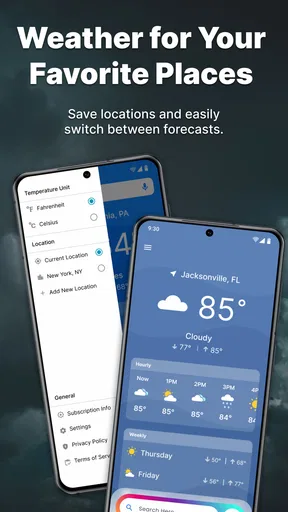
Does All Weather Mode: Weather Home offer support for multiple locations?
Yes, All Weather Mode: Weather Home allows users to track weather conditions for multiple locations. This feature is useful for frequent travelers or those who wish to monitor weather in different areas. Users can easily switch between locations and receive alerts for their selected areas.


